eSIM in Nigeria: How to Register and Activate It in 2026 (Complete Guide)
eSIM technology is gradually becoming more popular in Nigeria as more smartphones adopt digital SIM capabilities. Unlike traditional SIM cards, eSIM offers a more flexible and modern way to connect to mobile networks without needing a physical chip. If you’re looking to switch or try it out, this guide explains how to register and activate eSIM in Nigeria step by step.
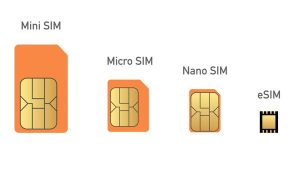
An eSIM (embedded SIM) is a digital SIM built directly into your device. Instead of inserting a physical card, users can download a mobile network profile and activate it instantly. This makes it easier to switch networks, manage multiple lines, and avoid the hassle of handling small SIM cards.
The introduction of eSIM in Nigeria began with major telecom providers rolling out limited support. Initially launched as a pilot, the service is gradually expanding as more users adopt compatible devices and network providers improve their infrastructure.
Before you begin the registration process, ensure your smartphone supports eSIM. Popular compatible devices include newer models of iPhones, Samsung Galaxy devices, and Google Pixel phones. If your device doesn’t support eSIM, you won’t be able to use the service.
To register for an eSIM in Nigeria, you’ll need to visit your network provider’s service center. Just like a regular SIM, eSIM registration requires proper identification and compliance with regulations. You’ll be asked to provide your National Identification Number (NIN) and other necessary details.
Once your registration is complete, the network provider will issue you a QR code. This QR code is essential because it contains the information needed to activate your eSIM profile on your device. Without it, you cannot proceed with the setup.
To activate your eSIM, go to your phone’s settings and locate the mobile network or SIM section. Choose the option to add a new eSIM or mobile plan, then scan the QR code provided. Your device will automatically download and install the eSIM profile.
After installation, your line should become active within a few minutes. You can then start making calls, sending messages, and using mobile data just like you would with a physical SIM card.
One of the biggest advantages of eSIM is flexibility. It allows you to store multiple network profiles on a single device and switch between them easily. This is especially useful for people who travel frequently or need separate numbers for business and personal use.
Another benefit is improved convenience and durability. Since there is no physical SIM to insert or remove, you don’t have to worry about losing or damaging it. It also frees up space inside your device for better design and performance.
However, it’s important to note that switching devices may require you to request a new QR code from your network provider. This ensures your eSIM profile is securely transferred to your new phone.
As eSIM adoption continues to grow in Nigeria, more telecom providers are expected to expand support and improve accessibility. This means better options and easier activation processes for users in the near future.
In conclusion, registering and activating an eSIM in Nigeria is a simple process once you have a compatible device and follow the correct steps. With its convenience, flexibility, and growing support, eSIM is quickly becoming the future of mobile connectivity in the country.