
How to Share WhatsApp Status to Facebook Stories (Step-by-Step Guide)
Sharing your updates across multiple platforms has become easier with social media integration. If you regularly post on WhatsApp, you can also share those same updates directly to your Facebook Stories without having to upload them separately.
This feature is very useful for anyone looking to reach a wider audience while saving time. Instead of posting the same photo or video twice, you can simply share it from WhatsApp to Facebook in just a few steps.
Before getting started, ensure that both WhatsApp and Facebook are installed on your device. Also, make sure you are logged into your Facebook account on your phone to allow seamless sharing.
To begin, open WhatsApp and go to the “Status” tab. This is where you can view your existing updates or upload a new one for your contacts to see.
After posting a new status, you will notice a “Share to Facebook Story” option appearing on your screen. This option typically shows up immediately after your status goes live.
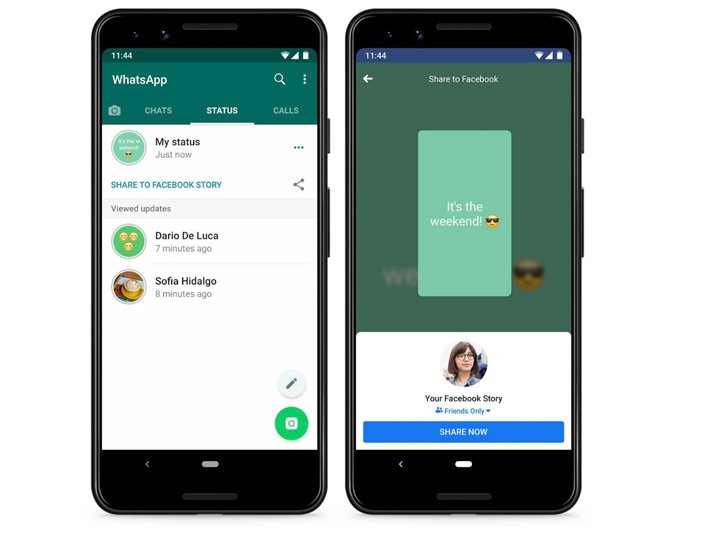
Tap on the “Share to Facebook Story” button. If it’s your first time using this feature, you may be asked to grant permission for WhatsApp to connect with your Facebook account.
Once access is granted, your status will be prepared for sharing. You may also see a preview screen where you can review or make slight adjustments before posting it to Facebook.
When you’re ready, tap the share option, and your status will be uploaded to your Facebook Story. The process is quick and usually completes within a few seconds.
It’s important to understand that you have control over what gets shared. You can decide which WhatsApp statuses you want to post on Facebook and which ones you prefer to keep private.
You can also adjust your privacy settings on both platforms. This allows you to control who can view your updates, ensuring that your content reaches only your intended audience.
If you do not see the sharing option, check that both apps are updated to their latest versions. Using outdated versions may prevent the feature from working properly.
Final Thoughts
Sharing your WhatsApp status to Facebook Stories is a simple and efficient way to stay active on both platforms. It saves time, reduces effort, and helps you keep your audience engaged without needing to create duplicate content.