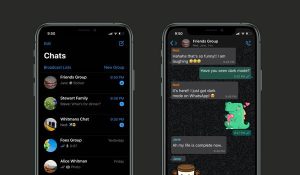
How to Enable Dark Mode on WhatsApp (Android & iPhone Guide)
Dark mode has become one of the most popular features on smartphones today. It not only gives apps a sleek appearance but also helps reduce eye strain and can even save battery life especially on devices with OLED screens.
If you use WhatsApp regularly, switching to dark mode can make your chatting experience much more comfortable, especially at night.
What is WhatsApp Dark Mode?
WhatsApp dark mode changes the app’s interface from a bright white background to a darker theme. This helps:
- Reduce eye fatigue in low-light environments
- Improve readability
- Lower battery consumption on some devices
How to Enable Dark Mode on WhatsApp (Android)
Follow these simple steps:
- Open WhatsApp
- Tap the three dots at the top-right corner
- Select Settings
- Tap Chats
- Click on Theme
- Choose Dark and confirm
Once selected, dark mode will be applied instantly.
Bonus Tip:
- You can select “System Default” so WhatsApp automatically matches your phone’s theme.
How to Enable Dark Mode on WhatsApp (iPhone)
On iPhones, WhatsApp follows your device’s system settings. Here’s what to do:
- Open Settings on your iPhone
- Tap Display & Brightness
- Select Dark
Once enabled, WhatsApp will automatically switch to dark mode.
Enable Dark Mode via Phone Settings (Android Alternative)
You can also activate dark mode across your entire phone:
- Go to Settings
- Tap Display
- Turn on Dark Theme
This will apply dark mode to supported apps, including WhatsApp.
Why You Should Use Dark Mode
Here are some key benefits:
- Less eye strain during nighttime use
- Better battery efficiency on OLED screens
- Improved visibility in low light
- Modern and stylish interface
Troubleshooting: Dark Mode Not Showing?
If you can’t find the dark mode option:
- Update WhatsApp to the latest version
- Ensure your phone software is up to date
- Restart the app after changes
- Check if your device supports dark mode
Final Thoughts
Switching to dark mode on WhatsApp is quick and worthwhile. Whether you’re using Android or iPhone, the feature enhances comfort, improves usability, and gives your app a cleaner look.
If you spend a lot of time chatting, this small change can make a big difference.