
How to Lock WhatsApp with Fingerprint on Android (Step-by-Step Guide)
Protecting your personal messages has become more important than ever, especially with how much sensitive information we store on our phones. If you use WhatsApp daily, adding an extra layer of security like fingerprint lock can help keep your chats safe from unauthorized access.
Fingerprint lock is a built-in WhatsApp feature that uses your phone’s biometric security to restrict access to the app. Once enabled, only your registered fingerprint can open WhatsApp, even if someone else is able to unlock your phone.
Before you can activate this feature, you need to confirm that your Android device supports fingerprint authentication. Most modern smartphones do, but you must first set up your fingerprint in your phone’s security settings.
After setting up your fingerprint on your device, open WhatsApp and tap the three-dot menu icon at the top-right corner of the screen. From the dropdown options, select “Settings” to access your account preferences.
Inside the Settings menu, tap on “Privacy.” This section contains several options related to your account visibility and security. Scroll down until you locate the “Fingerprint lock” feature.
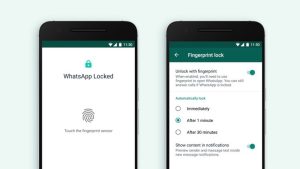
Tap on “Fingerprint lock,” then switch on the option to enable it. You will be asked to verify your fingerprint to confirm the action. This step ensures that only you can activate and manage the lock feature.
Once enabled, you can customize how the fingerprint lock behaves. WhatsApp allows you to choose when the app should automatically lock after you exit it—immediately, after one minute, or after thirty minutes.
You can also control whether message previews appear in notifications while the app is locked. For better privacy, you may choose to hide message content so others cannot read incoming messages without unlocking the app.
It’s worth noting that even with fingerprint lock enabled, you can still receive and answer WhatsApp calls without unlocking the app. This helps maintain convenience while still protecting your chats.
Final Thoughts
Enabling fingerprint lock on WhatsApp is a simple yet powerful way to improve your privacy. With just a few quick steps, you can prevent unauthorized access to your conversations and keep your personal information secure at all times.